
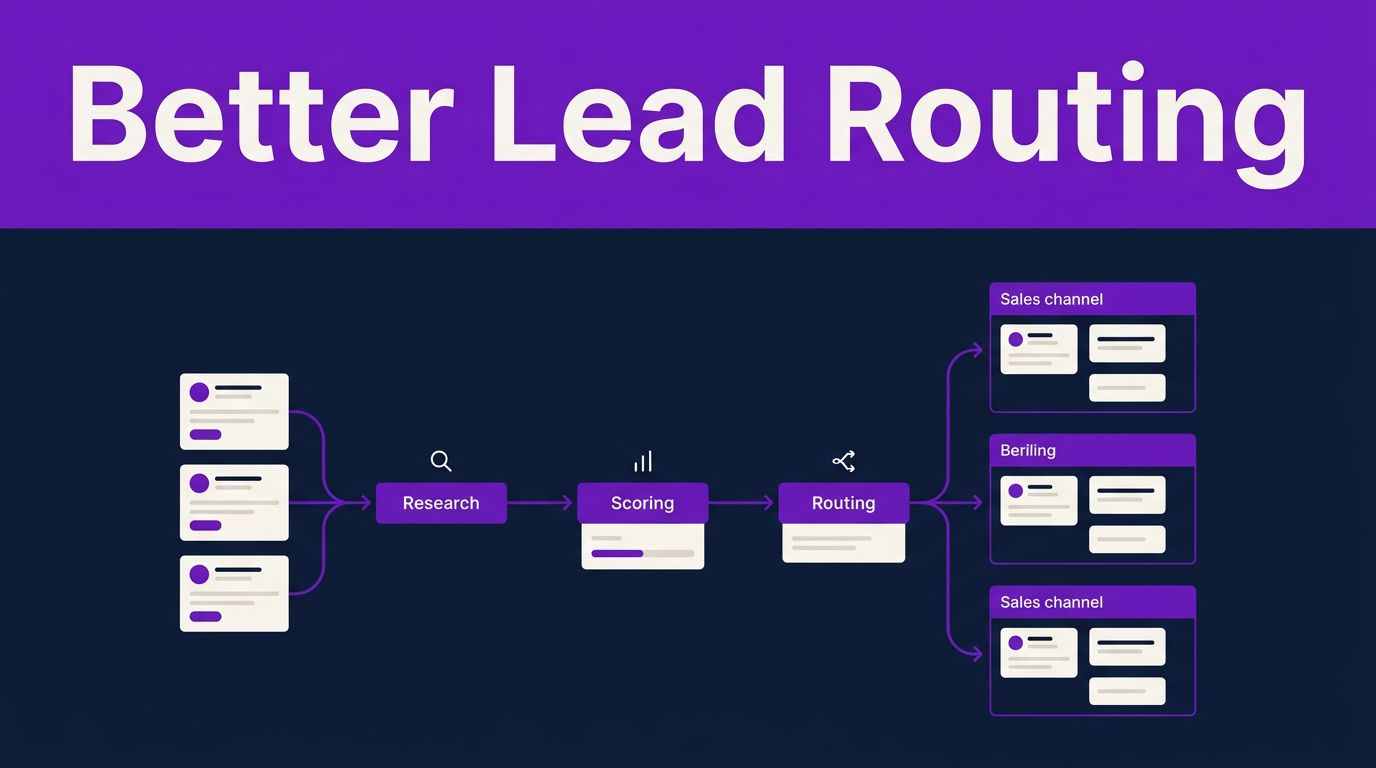

Processing inbound leads shouldn’t mean waiting in a spreadsheet while a sales rep performs manual triage to uncover basic company details. Zapier Agents lead qualification workflows can research submissions, apply your rules, score fit, and send each lead to the right next step.
The payoff is faster follow-up, as these automated workflows ensure you do not have to ask your team to trust a black box. Your Agent handles repeatable research and classification, while your CRM, Zaps, and salespeople handle the actions that need structure or judgment.
Key Takeaways
- Zapier Agents can review form submissions, research company details, and assign an accurate lead scoring value based on your instructions.
- Keep Zapier Agents focused on complex reasoning tasks, while your automated workflows handle data movement, update records, create tasks, and send alerts.
- Use clear fit, intent, urgency, and data-completeness criteria instead of vague prompts such as “find good leads.”
- Require human approval for sensitive accounts, unusual requests, and customer-facing outreach during early testing.
- Track outcomes in your CRM for at least two weeks before expanding automation.
Give Each Part of the Workflow a Clear Job
Zapier Agents, part of the broader AI by Zapier ecosystem, are goal-oriented assistants built at agents.zapier.com. An agent can interpret a lead’s form response, check connected CRM data, research public company information, and explain why it assigned a particular score. As you build these assistants, you might use Zapier Copilot to help define the underlying logic and instructions.
This capability represents a new level of AI orchestration that differs from traditional multi-step Zaps. While a standard Zap follows explicit, rigid trigger-action logic (such as a Typeform submission creating a HubSpot contact or posting a Slack alert), an agent introduces nuanced judgment before those downstream actions occur.
Your CRM remains the system of record, storing ownership, lifecycle stages, activity history, and consent fields. Because effective CRM integration is vital, the agent should never become the sole repository for lead status. Instead, use the following division of labor to ensure your data stays clean and organized:
| Workflow layer | Primary responsibility |
|---|---|
| Zapier Agent | Research, interpret answers, identify gaps, score and explain qualification |
| Connected Zap | Create or update CRM records, route tasks, notify Slack, create Gmail drafts |
| CRM workflow | Apply lifecycle stages, territory rules, deduplication, reporting, SLA tracking |
| Human reviewer | Approve outreach, handle strategic accounts, resolve uncertain or sensitive cases |
This setup keeps automated decisions visible and reversible. It also avoids the common mistake of asking an agent to manage every complex sales process rule when your CRM already handles those tasks more effectively.
For broader context on where AI fits within prospecting, Salesforce’s overview of AI lead generation fundamentals distinguishes engagement, analysis, and follow-up work that can support a sales team.
Build a Lead Qualification Agent Around One Intake Path
Start with one intake source for your inbound leads. A high-volume contact form, Typeform, Google Form, or inbound email queue is a practical first choice. Mixing forms, chat leads, event lists, and partner referrals at launch makes errors harder to diagnose.
Connect the data your Agent needs
First, connect the form or inbox that receives new leads. Then connect your CRM, such as HubSpot, Salesforce, or Airtable. Finally, connect Slack or Microsoft Teams for internal alerts, plus Gmail or Outlook if you want the workflow to prepare email drafts.
Give the Agent access only to the necessary knowledge sources. Company name, business email, role, form answers, region, current CRM status, and recent activity are often enough. Avoid loading private notes, payment data, contracts, or full customer histories into a first version.
Next, create the Agent and state its goal in plain language. It needs a defined task, approved data sources, decision rules, and a structured output. A vague instruction produces vague scoring.
Use an instruction like this:
Review each new inbound lead. Perform lead enrichment by researching only public company information and connected CRM fields. Score the lead from 0 to 100 based on fit, buying intent, urgency, and data completeness. Do not guess missing facts. Return the score, qualification tier, evidence, missing information, and recommended next action in a structured output for CRM compatibility.
The instruction makes three boundaries clear. The Agent can research public details, it must explain its result, and it can’t turn weak assumptions into confident facts.
Set up the handoff with Zaps
After the Agent returns its result, use Zaps or native CRM workflows for execution. For example, routing hot leads with a score of 80 or above can update the contact as sales-qualified, assign an owner, create a task, and post a Slack notification. A score between 50 and 79 can enter a review queue and create a personalized email draft. Lower-scoring leads can receive an approved nurture tag.
Do not let the Agent silently send sales emails on day one. Have it create a draft in Gmail or Outlook, then let a rep review the facts, tone, and claims before sending.
A simple routing map helps sales and marketing agree on what happens next:
| Score range | Lead status | Automated next step |
|---|---|---|
| 80 to 100 | High priority | Assign rep, create CRM task, alert sales channel |
| 50 to 79 | Needs review | Add review task and prepare a draft follow-up |
| 0 to 49 | Nurture or disqualify | Apply nurture segment or flag for data cleanup |
Teams that also need AI-assisted calling can compare this process with a Synthflow AI voice agent review. Voice qualification needs its own consent, escalation, and recording policies.
Use Qualification Criteria That Sales Will Trust
A score only helps if the sales team can understand it. Build your criteria with sales leaders before you turn on routing. Start with four areas that fit most B2B inbound workflows.
- Fit measures whether the company matches your target industry, region, company size, and use case, ensuring the lead aligns with your ideal customer profile.
- Intent looks for signals such as a demo request, pricing question, implementation inquiry, or stated problem.
- Urgency captures a stated timeline, active project, renewal date, or event that requires a quick response.
- Completeness checks whether the form has enough accurate information for a rep to act.
Give each category a weight to build an effective lead scoring model. For example, an enterprise SaaS company might weigh fit at 40 points, intent at 30, urgency at 20, and completeness at 10. A local service business may care more about location and booking time than job title.
Add exclusion rules too. Personal email domains, student research, unsupported countries, competitors, and vendors may need different paths. Avoid automatic rejection when information is incomplete. The better action is often a follow-up question or a human review task.
Try a more detailed Agent instruction:
Award fit points only when the lead matches approved industries, regions, or company-size ranges. Award intent points only for stated purchase, evaluation, or implementation signals. If a fact cannot be verified, label it “unknown.” Recommend “human review” for scores within five points of the routing threshold or when the account is strategic.
That last instruction prevents a fragile cutoff from deciding the fate of a potentially valuable opportunity. When managing enterprise lead qualification, this extra layer of caution ensures that high-value prospects receive the attention they deserve. Practical sales teams already use AI for qualification and follow-up, as the examples in this HubSpot sales process discussion show. The most dependable workflows still tie decisions back to clear CRM criteria.
Put Privacy and Hallucination Safeguards in Place
An Agent can sound certain even when its evidence is thin. Treat its score as a recommendation, especially for high-value accounts, regulated industries, government buyers, healthcare inquiries, or leads involving personal data. Building these safeguards is a critical part of a modern lead management process.
Tell the Agent to use public sources and connected business systems only. It should never infer protected traits, financial condition, buying authority, or personal intent from names, photos, or incomplete information. Keep sensitive fields out of prompts whenever possible.
Set a required response format with evidence. For each score, ask for the source of each point, the information it could not verify, and a confidence label. This gives reviewers a short audit trail instead of an unexplained number.
A lead score is useful when a salesperson can see why it exists and override it in seconds.
Limit who can edit Agent instructions, connected accounts, and routing Zaps. Then review Zapier’s audit logs and CRM activity records regularly. If the Agent starts classifying good leads as poor fits, pause the route, correct the instructions, and retest with known historical leads.
For teams reviewing several platforms, this comparison of AI sales agent software can help separate lead research tools from systems built for outreach or phone conversations. In this context, Zapier Agents can effectively function as an AI SDR to automate complex research tasks before a lead ever reaches your sales team.
Fix Common Lead Qualification Problems
Low-quality output usually begins with unclear input. If form answers are sparse, add one or two high-value fields such as company size, timeline, current tool, budget range, or the main problem the lead wants to solve. The goal is to maximize sales productivity by capturing essential data without turning every form into an interrogation.
Duplicate contacts can also cause bad routing. Let your CRM’s deduplication rules run before the Agent classifies the lead. An existing opportunity should alert the account owner instead of launching a new nurture sequence. When you encounter inaccurate data, remember that lead enrichment errors are often fixed by refining your knowledge sources rather than just adjusting the prompt. Be sure to state which signals must come directly from the lead, which can come from public sources, and which require a human decision.
Finally, review false positives and false negatives every week. Compare Agent scores with accepted meetings, qualified opportunities, and closed revenue. Those results show whether your rules match reality. As your workflow matures, you might even explore agent-to-agent calling to facilitate seamless handoffs between specialized automation bots.
Your team can also use Free AI Tools to draft internal qualification rubrics, email review checklists, and sales playbooks before adding them to an Agent’s knowledge base.
Frequently Asked Questions
How do Zapier Agents differ from standard multi-step Zaps?
While a standard Zap follows rigid, linear trigger-action logic to move data, Zapier Agents use AI to provide nuanced judgment and reasoning before those actions occur. This allows the agent to research, interpret, and score a lead based on complex instructions rather than just passing raw information from one app to another.
Can a Zapier Agent automatically contact leads for me?
It is recommended to have your agent draft emails in Gmail or Outlook rather than sending them automatically, especially during early testing. This ensures a human sales representative can review the lead’s details and the AI’s logic to confirm the tone and accuracy before any message reaches a potential customer.
What should I do if my Agent starts misclassifying leads?
First, review your audit logs and compare the agent’s scoring against actual CRM outcomes to identify the pattern of errors. Often, you can resolve these issues by refining your prompt instructions to be more specific, limiting the data sources, or adjusting the thresholds used for qualification criteria.
How can I ensure my Agent doesn’t ‘hallucinate’ information?
To minimize inaccuracies, explicitly instruct the agent to only use provided data sources and public information while requiring it to cite evidence for every score assigned. If the agent cannot verify a piece of information, mandate that it label the data as ‘unknown’ rather than making an assumption.
Make Automation Accountable
Zapier Agents remove the repetitive work between a form submission and a representative’s first response by handling the research, classification, and explanation of data. By integrating Zaps and CRM workflows, your team can execute defined actions without the need for manual data entry.
The most effective Zapier Agents lead qualification setup gives your automation a narrow, measurable role. By keeping humans in charge of exceptions, sensitive data, and critical customer conversations, you ensure that every interaction remains personalized. Ultimately, these Zapier Agents improve sales outreach efficiency, allowing your team to focus their energy on closing high-value inbound leads rather than chasing unqualified prospects. As you refine your rules based on real pipeline results, you will see a significant increase in the overall quality of your automated process.
This post may contain affiliate links. If you make a purchase through these links, I may earn a small commission at no extra cost to you.