

Scalenut is one of those AI tools that tries to do the whole job, not just spit out paragraphs. It is built mainly for blog content, but it also helps with keyword research, article outlines, SEO optimization, traffic insights, and internal linking.
After going through the platform feature by feature, my honest takeaway is simple: Scalenut feels more like an SEO content suite than just another AI writer.
Best Free AI Writing Tools! |
|
🎁I Have Free AI Tools for You! |
| Access Now! |
A lot of tools stop at content generation. Scalenut pushes further. It helps you find what to write, structure it, optimize it, and in some cases even improve site-wide SEO workflows.
If that is what you need, this tool stands out fast.
Table of Contents
- What Scalenut is designed for
- First impressions of the Scalenut dashboard
- Using Scalenut Article Writer in Cruise Mode
- Editing and expanding the article inside Scalenut
- Scalenut Content Optimizer: one of the strongest features
- Scalenut Keyword Planner for topic clusters and keyword ideas
- Traffic Analyzer and site-level SEO tools
- App integrations
- Scalenut pricing
- What I like about Scalenut
- Where Scalenut is not perfect
- Who Scalenut is best for
- My final verdict on Scalenut
- Frequently Asked Questions About Scalenut
What Scalenut is designed for
At its core, Scalenut is aimed at people who publish blog content consistently. That includes:
- Bloggers who want faster content production
- Affiliate marketers targeting search traffic
- Business owners creating SEO content in-house
- Agencies and marketing teams managing multiple websites or clients
The main appeal is that I do not have to jump between five different tools just to get one article done. With Scalenut, I can research a keyword, generate a title, build an outline, write the article, improve SEO coverage, and review performance-oriented suggestions in one place.
First impressions of the Scalenut dashboard
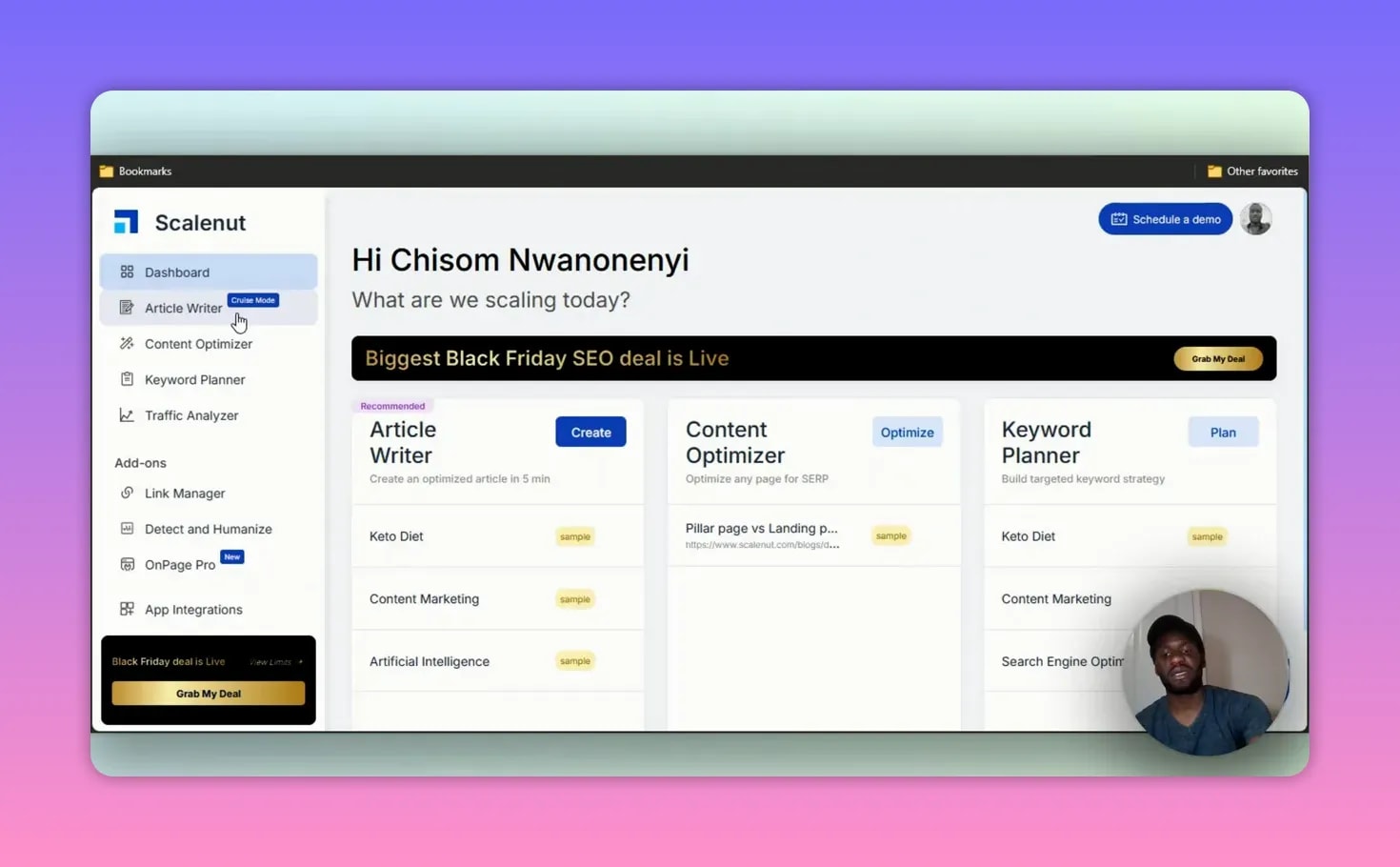
The layout is straightforward. On the left side, Scalenut organizes its features into clear sections. The main tools I looked at were:
- Article Writer
- Content Optimizer
- Keyword Planner
- Traffic Analyzer
- Link Manager
- Detect and Humanize
That lineup alone tells you what kind of product this is. It is not trying to be only a chatbot-style writer. It is trying to help you run content operations.
Using Scalenut Article Writer in Cruise Mode
The first feature I tested was the Article Writer, specifically the Cruise Mode workflow. This is where Scalenut takes you from keyword input all the way to a full draft.
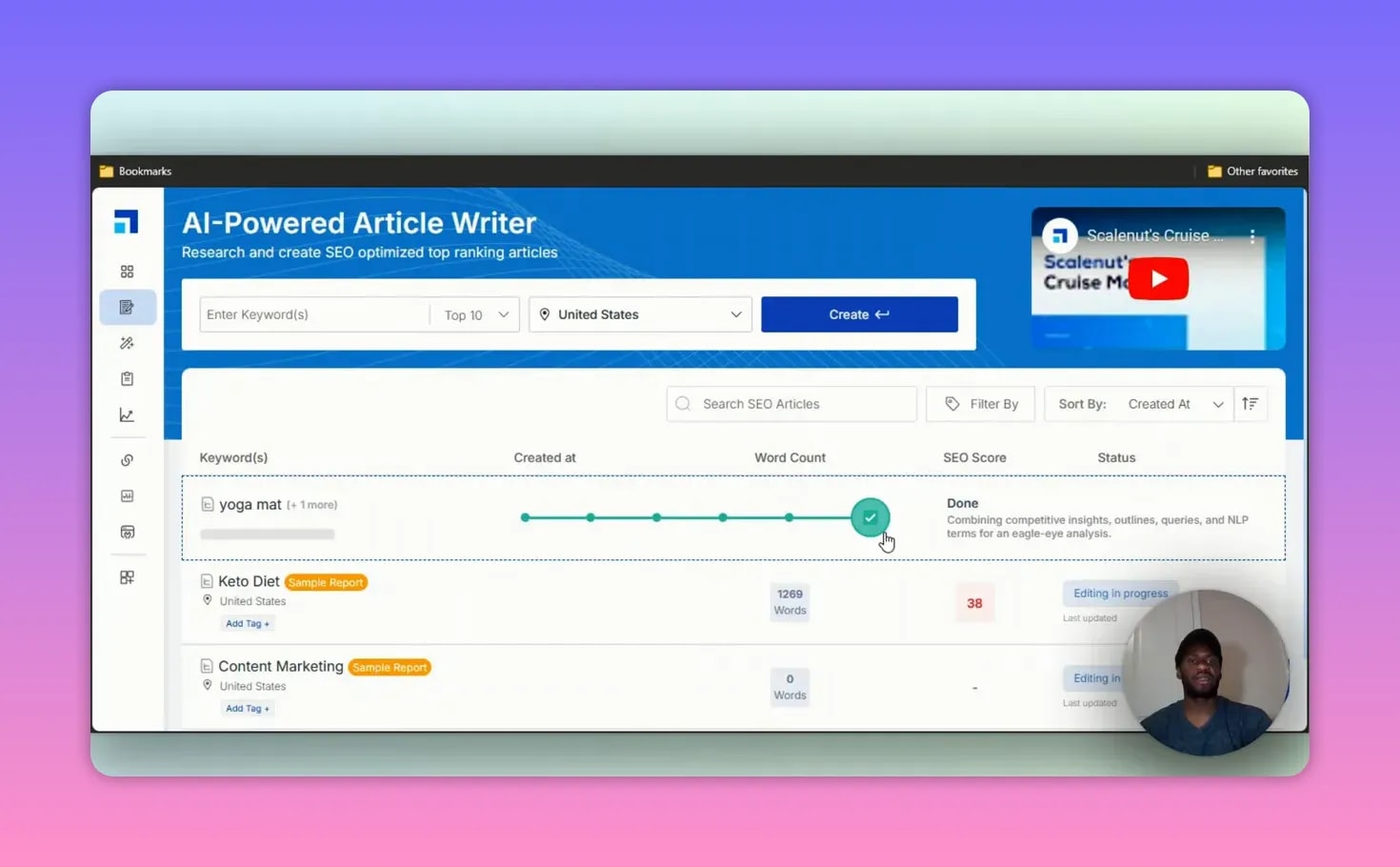
Step 1: Enter a primary and secondary keyword
I started with a sample topic around yoga mats. Scalenut lets you add:
- A primary keyword
- A secondary keyword
- A target location
The location setting matters because it helps Scalenut tailor results to the country you want to target. For example, if I am writing for a U.S. audience, I can keep the target location set to the United States.
Once I clicked create, Scalenut began preparing the article data. It showed each task as it worked through them, including:
- Fetching questions
- Extracting citations
- Pulling related key terms
- Packaging the data for writing
This is one of the better parts of the workflow because it shows that Scalenut is not generating blind. It is building the draft with SEO context in mind.
Step 2: Choose the article type and key terms
After the prep stage, Scalenut suggested an article type. In the example, it recommended a listicle, which honestly makes sense for a lot of modern blog posts. Roundups, rankings, and step-by-step formats still perform well because they are easy to scan.
Scalenut also showed:
- Reference articles from existing websites
- Suggested key terms related to the topic
- The option to manage and edit those key terms
That key term list is important. It included phrases tied closely to the topic, like yoga mat, hot yoga, sustainable materials, organic cotton, PVC, and lightweight foam. If I want tighter topical coverage, I can remove terms that do not fit and add better ones manually.
This is one reason I think Scalenut is stronger than basic AI writers. It is not just asking, “What do you want to write?” It is asking, “What should be in this article if you want to rank?”
Step 3: Anti-AI detection and writing preferences
Scalenut also includes an anti-AI detection option. When enabled, the platform says it reduces the likelihood of content being flagged as AI-generated and pushes the writing toward more natural language.
I like that the option is there, but I also like that it can be switched off. That gives flexibility depending on how you want to test your output.
Beyond that, I could also set:
- A short description of the blog topic
- A tone of voice
- Whether to generate AI images
For the sample run, I kept the tone fairly standard and chose to generate only a featured image.
Step 4: Generate titles
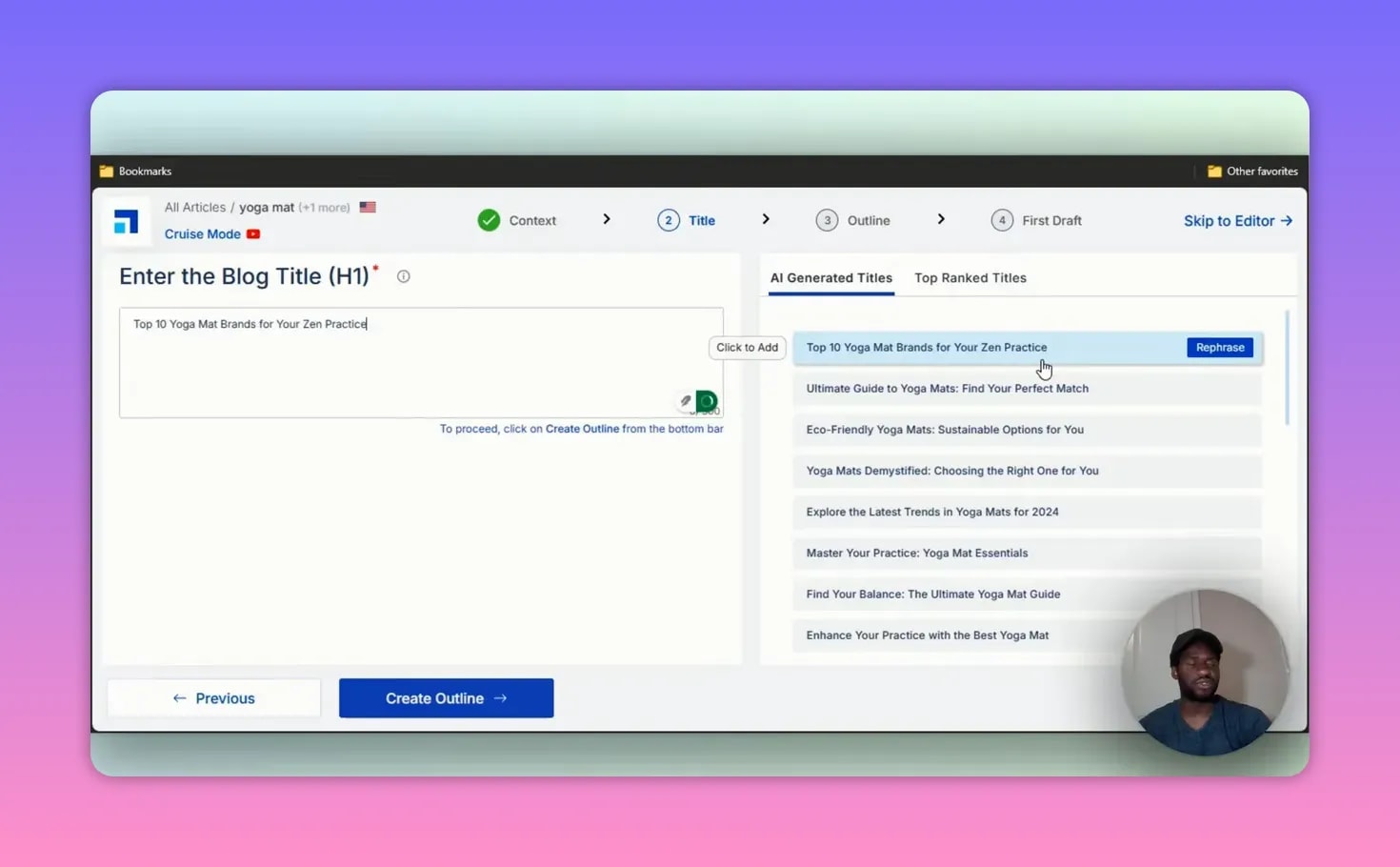
Scalenut then suggested several possible titles. Some were more catchy, some were more practical. A few examples followed angles like:
- Top yoga mats for your practice
- Eco-friendly yoga mat options
- Trend-focused yoga mat topics for 2026
The title generation is useful because it gives multiple ways to frame the same topic. If I am writing a commercial article, I can choose a more conversion-friendly angle. If I want something educational, I can pick that instead.
Step 5: Build and edit the outline
Once the title was selected, Scalenut created an outline. This part was surprisingly solid. The sample included:
- An introduction
- Main H2 sections
- Specific subtopics like natural rubber yoga mats and cork yoga mats
- FAQ-style questions
- A conclusion
- An optional CTA section
The FAQ suggestions were especially helpful because they were tightly connected to the keyword. For example, Scalenut proposed questions like what eco-friendly yoga mats are made of and how to care for them.
If I wanted to turn the article into a more conversion-focused piece, I could add a call to action. Options included things like sharing on social media, leaving a comment, or redirecting the reader to another page. In the example workflow, I skipped the CTA.
Step 6: Generate the full article
After that, Scalenut took a few minutes to create the full article. The draft included:
- A generated featured image
- A short image description
- Key highlights
- The main body content
- A conclusion
The sample article landed at just under 600 words, which is a decent starting point but definitely not the final version I would publish without editing.
That said, this is where Scalenut becomes useful as a working draft tool. I can take what it gives me and then improve it section by section.

Editing and expanding the article inside Scalenut
Scalenut does not leave you stuck with the first version it generates. Inside the editor, I can refine sections in a few ways, including:
- Expand a paragraph
- Shorten a paragraph
- Rephrase the text
That is practical because AI-generated first drafts are rarely perfect. Sometimes a section needs more detail, and sometimes it needs trimming. The expand feature is especially useful if a heading feels too thin and I want more substance without rewriting from scratch.
Scalenut also lets me export the content into its editor, where I can continue polishing it before moving it into WordPress.
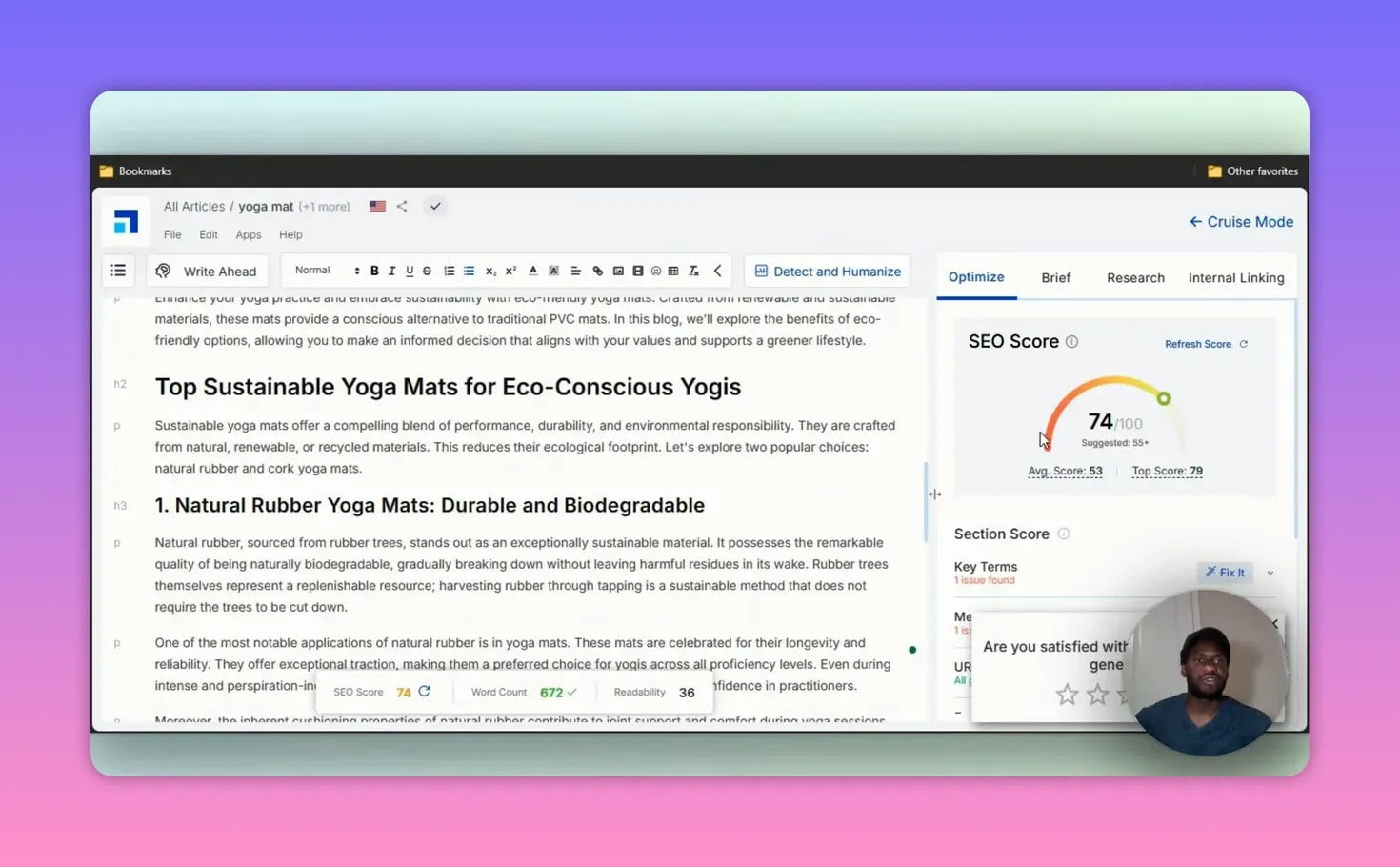
The SEO score inside the editor
One thing I noticed right away was the built-in SEO score. In the example, the content scored 74 out of 100, which is already above the general threshold I like to see for a solid starting draft.
The editor also tracks elements like outbound links. That is useful because if I am building a WordPress post, I still need to think about:
- External linking
- Internal linking
- Topical completeness
- Overall article polish
Scalenut helps with some of that directly, and the rest can be handled after export. If you are already comparing platforms in this space, you may also want to look at other options in this guide to Jasper AI alternatives.
Scalenut Content Optimizer: one of the strongest features
If I had to point to one feature that makes Scalenut more than just an AI writer, it would be the Content Optimizer.
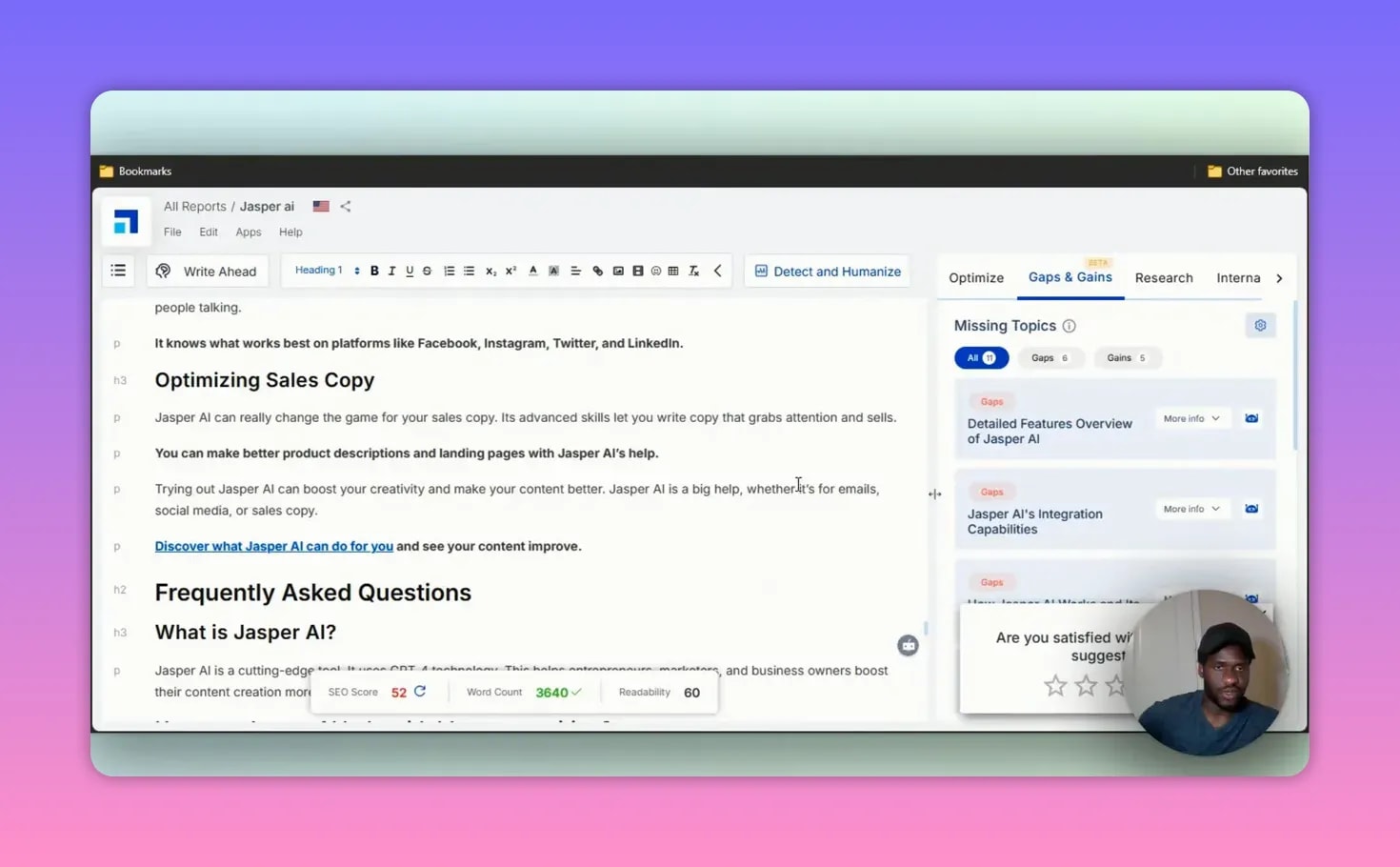
This tool lets me paste in an existing article and optimize it around a target keyword. To test it, I dropped in a blog post and used “Jasper AI” as the keyword.
From there, Scalenut analyzed the page and looked for missing topical coverage.
How gaps and gains work
The optimizer breaks suggestions into two useful buckets:
- Gaps which are important subtopics missing from the article
- Gains which are improvements or additions you have already implemented
In the sample analysis, Scalenut suggested missing areas such as:
- Detailed features overview of Jasper AI
- How Jasper AI works
- Applications and implications of the tool
- Its role in content creation and marketing strategies
- Customer and team management
- The founding story and vision behind the company
That is exactly the kind of help content marketers need. Sometimes an article is decent, but it does not rank because it fails to cover the right supporting topics. Scalenut identifies those blind spots and gives me a way to fill them.
I can click into those suggestions, add them to the article, and improve overall relevance. This is one of the clearest examples of Scalenut acting like an SEO content assistant rather than a simple text generator.
Scalenut Keyword Planner for topic clusters and keyword ideas
The Keyword Planner is another feature that adds serious value.
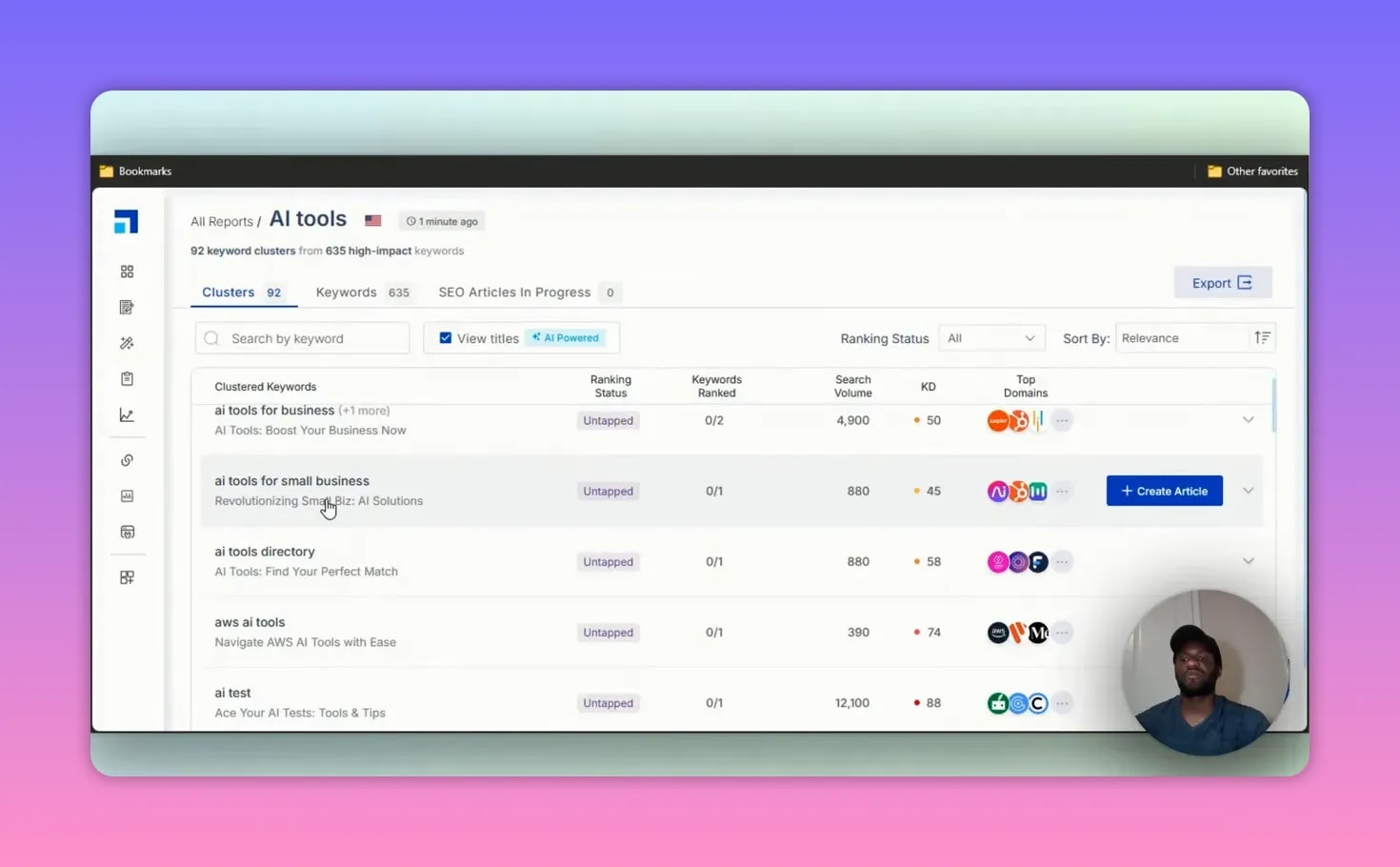
To test it, I entered a topic around AI tools, added a domain, and included a competitor site. After that, Scalenut generated a content plan with:
- Topic clusters
- High-impact keywords
- Article creation opportunities tied to those terms
In the example, it returned 92 different clusters and 635 high-impact keywords. Some cluster ideas included:
- AI tools for education
- AI tools for business
- AI tools for small business
That is huge if you are building out a content strategy. Instead of guessing what to write next, Scalenut helps map a broader content ecosystem.
If your work revolves around publishing consistently, that kind of planning support matters a lot. It is also why I see Scalenut as useful not just for bloggers, but for anyone building a serious content machine. For broader tool recommendations, this roundup of AI tools for content creators is worth checking out too.
Traffic Analyzer and site-level SEO tools
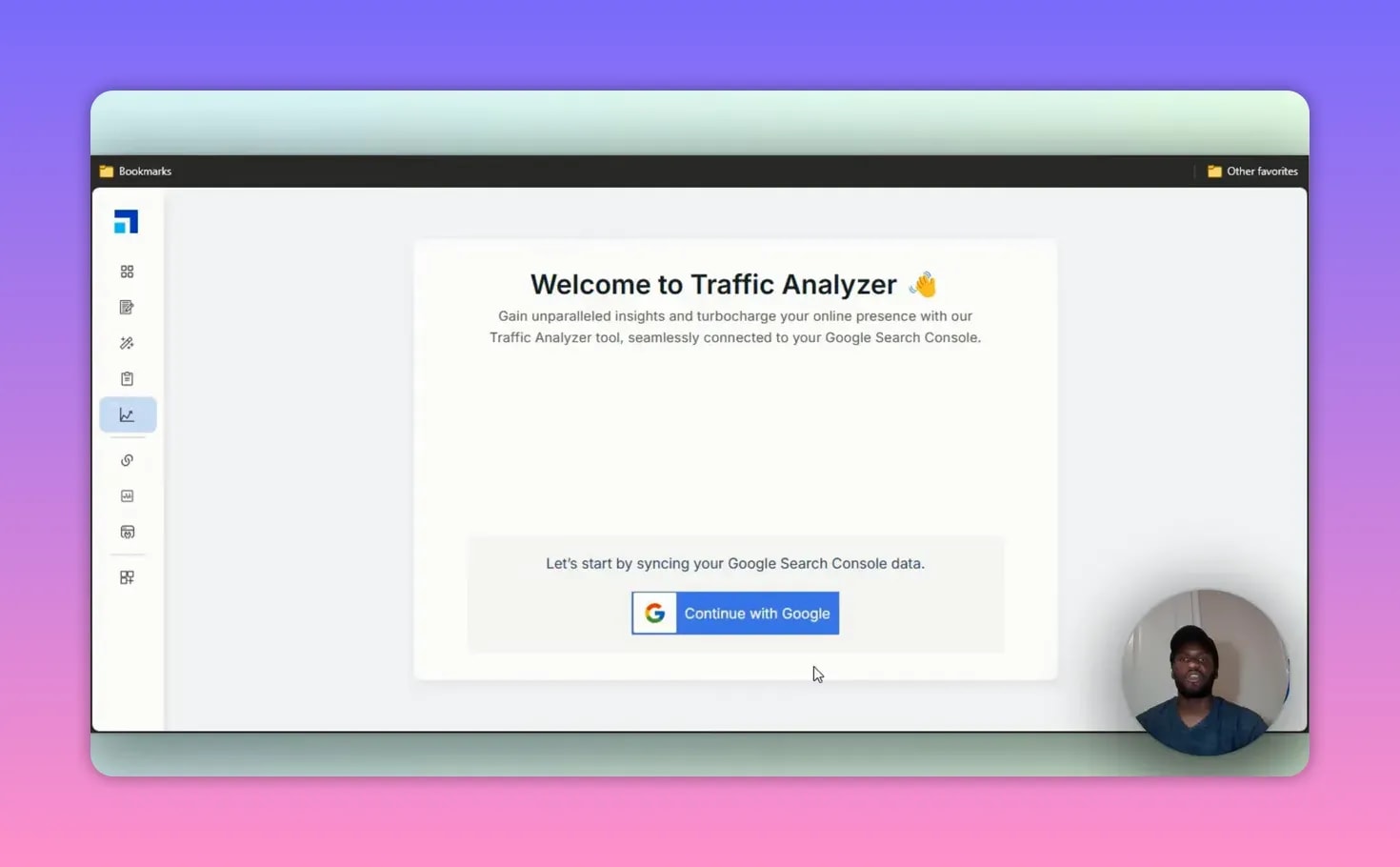
Scalenut also includes a Traffic Analyzer. To use this, I need to sync my website so the platform can analyze traffic data and provide insights.
While I did not go deep into that workflow here, the feature matters because it extends Scalenut beyond article creation. It starts connecting content production with actual site performance.
That same bigger-picture approach shows up in Scalenut’s add-ons too.
Link Manager
The Link Manager is focused on internal linking, not backlink outreach. It scans the site and helps identify opportunities to add internal links between pages.
That is useful because internal linking is one of those SEO basics people know they should do, but often skip because it is time-consuming. A tool that helps spot those opportunities can save a lot of manual work.
Detect and Humanize
Scalenut also offers a Detect and Humanize feature. There is a free option with a word allowance, and paid plans for more volume. This is geared toward rewriting AI-generated text into something that feels more natural.
I did not go deeply into this add-on because it requires an extra setup path, but if AI detection is a concern in your workflow, the feature is there.
On Page Pro
The On Page Pro add-on is designed to tune up your site automatically. According to the platform flow, it helps by:
- Identifying SEO issues on your website
- Suggesting solutions
- Automating lighter deployment fixes
- Giving access to consultation support
This is where Scalenut starts pushing toward technical SEO assistance, not just content help.
App integrations
Scalenut integrates with a handful of useful tools, including:
- Copyscape
- Semrush
- WordPress
- Shopify
It also allows requests for new app integrations, which is a nice touch. If a tool is going to sit at the center of my content workflow, integrations matter.
Scalenut pricing
Pricing is one of the more attractive parts of Scalenut, especially if promotional discounts are active.
The plans covered were structured roughly like this:
Essential plan
This entry-level option was shown at $9 per month during the promotional period, with a 7-day free trial.
It included:
- Ready-to-rank humanized articles
- 5 articles per month
- Optimization and humanization for up to 5 existing articles monthly
- AI images
- Factual content support
- Traffic insights
- SERP analysis
- Chat and email support
- Document sharing
- NLP key terms
For someone publishing around one article a week, that is actually a workable starter plan.
Growth plan
The next level was shown at $22 per month.
It included:
- 30 articles per month
- Humanization for 30 pages per month
- Analysis for 500 web pages per month
- Unlimited domains
- Internal linking features
- Auto optimization
- Topic gap suggestions
- New topic ideas
- Third-party integrations
- Auto-publishing
- Unlimited tone of voice options
This is the plan that makes the most sense for people doing larger-scale publishing.
Pro plan
The higher-tier option was shown at $149 per month and is clearly aimed at marketing teams or agencies.
It included:
- 75 articles per month
- Optimization and humanization for 75 pages monthly
- 75 keyword clusters per month
- Analysis for 1,500 web pages per month
- All Growth features
- Keyword cannibalization support
- Advanced Keyword Planner features
If I had clients or managed several content-heavy sites, this is the kind of tier I would consider.

Available add-ons
Scalenut also listed separate add-ons, including:
- Link Manager for internal linking
- AI Detector and Humanizer
- On Page Pro
That add-on structure is useful if you want to customize your toolkit instead of paying for every feature by default.
What I like about Scalenut
- It is genuinely all-in-one. Keyword planning, writing, optimization, and SEO features are built into one platform.
- The article workflow is easy to follow. Cruise Mode takes me from keyword to draft in a clean step-by-step process.
- Content Optimizer is strong. The gaps and gains framework is practical and easy to act on.
- Keyword clustering is valuable. It helps with long-term content strategy, not just one-off posts.
- Internal linking and SEO add-ons make it more complete. That is a real advantage over lightweight AI writers.
- The lower pricing tiers are accessible. Especially for solo creators or smaller sites.
Where Scalenut is not perfect
- The first draft still needs editing. That is normal for AI writing, but it is worth saying.
- Some features are add-ons. Depending on your needs, total cost can rise.
- Advanced tools may be overkill for casual users. If all you want is a simple paragraph generator, this might be more platform than you need.
Who Scalenut is best for
Scalenut makes the most sense for:
- People publishing SEO blog content consistently
- Users who need more than just AI writing
- Site owners who want topical coverage and optimization help
- Teams managing multiple domains or client work
It is probably less ideal for someone who only needs occasional short-form AI writing. In that case, a simpler tool or even ChatGPT may be enough.
But if you want an actual content workflow system, Scalenut is much more compelling.
My final verdict on Scalenut
My honest opinion is that Scalenut is one of the better AI SEO writing platforms for people who want a real content system.
What impressed me most is that it does not stop at writing. A lot of AI tools are basically text boxes with branding.
Scalenut clearly tried to solve the wider SEO problem: planning, writing, optimizing, and improving content performance.
That is why I think Scalenut stands out. It feels like the team behind it actually listened to what content creators and marketers were asking for.
People do not just want another writing tool. They want something that helps them build search traffic more efficiently.
And that is exactly where Scalenut has real value.
If you want to explore more software in this category, there are also other AI tool comparisons collected here: general AI tool comparisons.
Frequently Asked Questions About Scalenut
Is Scalenut just an AI writer?
No. Scalenut is much more than an AI writer. It includes keyword planning, article generation, content optimization, traffic analysis, internal linking support, and additional SEO-focused tools.
Can Scalenut generate full blog posts?
Yes. With its Article Writer and Cruise Mode workflow, Scalenut can generate a complete blog post from a target keyword, including titles, outlines, FAQs, and a draft article.
Does Scalenut help with SEO?
Yes. SEO is one of Scalenut’s strongest areas. It helps with related key terms, topical coverage, keyword clustering, content gaps, internal linking opportunities, and optimization scoring.
What is the best Scalenut feature?
The Content Optimizer is one of the most useful features because it shows what your article is missing and helps you improve topical relevance through its gaps and gains suggestions.
Is Scalenut good for beginners?
Yes, especially because the workflow is guided and easy to follow. Beginners can use it to create and optimize content without needing a deep SEO background, while more advanced users can take advantage of the planning and analysis tools.
Does Scalenut work for agencies or teams?
Yes. The higher plans are clearly designed for larger publishing needs, including more articles, more keyword clusters, more page analysis, and features like keyword cannibalization support.